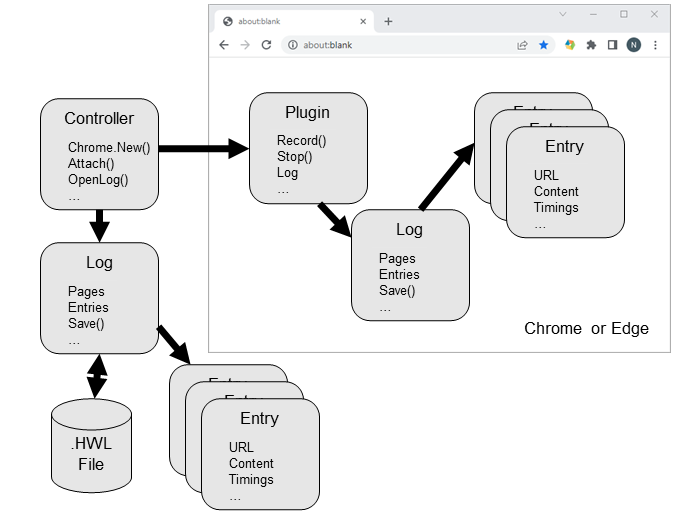
The diagram below shows the relationship between the four main automation classes and the browser:
HttpWatch captures its data using a browser add-on for Microsoft Edge or Google Chrome. It can also display previously recorded log files in HttpWatch Studio.
Although HttpWatch can be manually controlled, it is sometimes useful to control it programmatically when running automated tests or performing other repetitive tasks. The automation interface allows programs to be written that perform actions of the HttpWatch extension and provide access to data in existing .HWL and .HAR files.
There are over thirty classes in the automation interface, but four main classes are used to control HttpWatch.
The diagram below shows the relationship between the four main automation classes and the browser:
The four main automation classes used by HttpWatch are described in this section.
The starting point for controlling HttpWatch is the Controller class. An automation client uses this to create a new instance of the HttpWatch extension or to open existing log files.
The Chrome and Edge properties return an object that can create or attach to the HttpWatch add-on in the browser.
The interface to the HttpWatch Chrome or Edge extension is provided by the Plugin class. It has methods that can be used to start and stop the recording of HTTP traffic. Other methods and properties allow the user to manage the HttpWatch log files and configure automatic recording.
The Plugin object's GotoURL method can be used to direct the browser to any specified URL.
Other properties allow the automation client to determine whether a page has finished loading and whether the extension is currently recording requests.
Recorded requests are reached through the Log property.
Log Class
The Plugin object's Log property accesses a Log object that contains the active log of HTTP requests and responses that have been recorded by HttpWatch.
Methods and properties are provided that allow the recorded data to be examined, saved to a file or exported in different formats (e.g. CSV or HTTP Archive .HAR)
Alternatively, the OpenLog method of the Controller class opens a log file and returns a reference to a Log object that represents the requests and responses that were recorded in that file.
Entry Class
Each Log object contains a list of Entry objects which hold the details of a single HTTP transaction (i.e. request and response).
The Content property holds information about the requested HTTP resource. Its Data property returns the content body as raw bytes, while its Text property returns text content decoded as Unicode. The content may have been received from the network or read from the browser cache.
The Request and Response properties provide access to lists of the headers and cookies that were sent to or received from the web server.
There are also numerous other properties that provide further details of the transaction, including the TCP/IP address and port number, HTTP method, result or error information, timings, and URL.